
Internal Linking for Blog SEO
Most bloggers spend all their time on keywords, backlinks, and content quality — and completely ignore one of the easiest SEO wins available: internal linking. It costs nothing, takes a few minutes per post, and can meaningfully improve how Google understands and ranks your site.
In this guide, we’ll break down exactly what internal linking is, why it matters so much for SEO in 2026, and how to actually do it right on your blog.
1. What Internal Linking Actually Means
Internal linking is simply linking from one page on your website to another page on the same website. This is different from external links, which point to other websites, and backlinks, which are links from other websites pointing to yours.
Example: If you write a post about SEO tips and link to your own earlier post about keyword research, that’s an internal link.
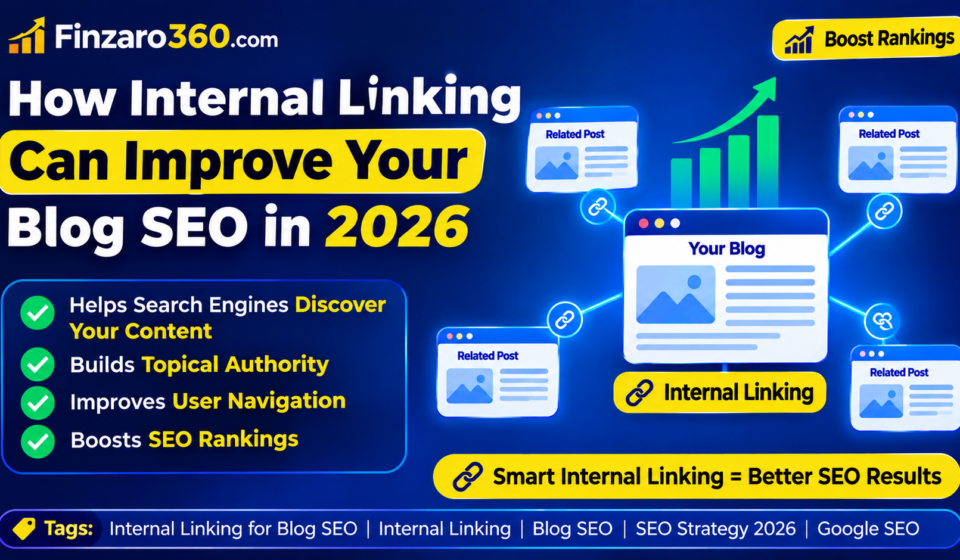
It sounds basic, but internal links do three important jobs at once:
- Help readers navigate to more useful content on your site
- Help Google discover new or older pages faster
- Help Google understand which pages on your site are most important
2. Why Internal Linking Matters for SEO
Search engines don’t just look at individual pages in isolation — they look at how your entire site is connected. Internal linking directly influences this in several ways.
a) Faster discovery of new content When you link to a new post from an older, already-indexed page, Google finds that new page faster through normal crawling, instead of waiting to discover it through the sitemap alone.
b) Passing “link equity” between pages When a strong, well-ranking page links to a newer or weaker page, some of that authority passes along. This can help newer posts gain traction faster than they would on their own.
c) Better topical understanding When you link related posts together, Google gets a clearer picture of what topics your site covers in depth — which helps you build topical authority over time.
d) Lower bounce rate, longer session time Readers who click into another relevant post instead of leaving your site send positive engagement signals, which indirectly supports rankings.
If you’re already unsure why some of your posts aren’t getting traffic despite good content, weak internal linking is often part of the answer. This guide on why your website is not getting organic traffic covers this and other common causes in detail.
3. Internal Linking Helps With Indexing Problems Too
One of the most practical benefits of internal linking is speeding up indexing for new posts. Google discovers pages faster when they’re linked from pages it already crawls regularly.
If a new post has zero internal links pointing to it, it becomes what’s called an “orphan page” — technically live, but poorly connected to the rest of your site. Orphan pages often take much longer to get indexed, or sometimes don’t get indexed at all.
This connects directly to two common issues bloggers run into:
- If your post is stuck at “crawled but not indexed,” weak internal linking is one of the most common causes — this guide on why Google crawls your blog post but doesn’t index it explains this in more depth.
- If a post is published but simply not showing up on Google at all, checking internal linking is one of the first diagnostic steps — covered in this guide on what to do when a blog post is published but not showing on Google.
4. How Many Internal Links Should You Add?
There’s no exact magic number, but a good general rule for most blog posts is 2 to 5 internal links per post, depending on the length and topic depth.
Guidelines:
- Shorter posts (under 1000 words): 2-3 internal links
- Longer, in-depth posts (2000+ words): 4-6 internal links
- Avoid linking to the same post more than once or twice within the same article
- Don’t force links just to hit a number — every link should genuinely help the reader
Too few links wastes an opportunity. Too many links, especially forced or irrelevant ones, can feel spammy and hurt readability.
5. Where to Place Internal Links
Placement matters almost as much as the number of links. A link buried in a place no one reads won’t help much.
Best places to add internal links:
- Naturally within a paragraph, where the topic is directly relevant
- In an intro paragraph, pointing to a foundational post on the topic
- In a “related articles” or “further reading” section near the end
- In a summary or conclusion, linking to a logical next step for the reader
Avoid:
- Linking in random, unrelated sentences just to add a link
- Stacking multiple links right next to each other
- Linking the same anchor text to different pages inconsistently
6. Use Descriptive Anchor Text
The anchor text (the clickable words) should clearly describe what the linked page is about — both for readers and for Google.
Weak anchor text examples:
- “Click here”
- “Read more”
- “This article”
Strong anchor text examples:
- “how to check if your blog post is indexed”
- “common mistakes after publishing a blog post”
- “why your website isn’t getting organic traffic”
Descriptive anchor text helps Google understand what the linked page is about, which supports rankings for that page’s target keyword. It also helps readers know exactly what they’ll get if they click.
7. Link From Old Posts to New Posts (Not Just the Other Way Around)
A common mistake is only adding internal links inside new posts, while ignoring older content. But some of your strongest SEO value often comes from linking backward — old, already-indexed, well-ranking posts linking forward to your newer content.
Practical routine:
- Every time you publish a new post, go back and add 2-3 links to it from relevant older posts
- Prioritize linking from your highest-traffic or best-ranking posts, since they carry more authority
- Set a recurring reminder to review and refresh internal links every few months
This step is often part of a proper post-publishing routine. If you want a full checklist of what to do right after publishing, including this exact step, this guide on what to do immediately after publishing a blog post walks through it in detail.
8. Build Content Clusters Around Core Topics
One of the most effective ways to use internal linking strategically is by building “content clusters” — groups of related posts that all link to each other and to one central “pillar” post.
How it works:
- Pick a broad topic (for example, “Blog SEO in 2026”)
- Write one comprehensive pillar post covering the topic broadly
- Write several smaller, specific posts covering subtopics (indexing, internal linking, common mistakes, post-publish checklist, etc.)
- Link all the smaller posts back to the pillar post, and link the pillar post out to each smaller post
This structure signals strong topical authority to Google and makes it much easier for readers to explore related content, which increases time on site and pageviews per session.
For example, a cluster around “getting blog posts indexed and ranked” could naturally connect these related pieces: a guide to 10 major steps to take before publishing an article, a guide on common errors during and after publishing a blog post, and a guide on how to get a new blog indexed by Google fast — all linking to each other where relevant.
9. Avoid These Common Internal Linking Mistakes
Even bloggers who understand the value of internal linking often make small mistakes that reduce its effectiveness.
Common mistakes:
- Linking to outdated or removed posts (always double-check links still work)
- Using the exact same anchor text for every link to a page, which can look unnatural
- Ignoring internal linking entirely for cornerstone/pillar posts, which need it most
- Adding too many links in a single paragraph, overwhelming the reader
- Never auditing old posts to add links to newer, relevant content
Regularly auditing your site’s internal linking — not just adding links to new posts — is what separates a strong internal linking strategy from an inconsistent one.
10. How to Audit Your Internal Linking
Every few months, it’s worth reviewing your site’s internal linking structure to catch orphan pages and missed opportunities.
Simple audit process:
- Make a list of your most important or best-performing posts (pillar content)
- Check whether your newer posts link to these pillar posts where relevant
- Use Google Search Console or an SEO plugin to check for pages with very few or zero internal links pointing to them
- Add links from 2-3 relevant older posts to any orphan pages you find
- Update anchor text where it’s too generic or repetitive
This doesn’t need to be a huge project — even reviewing 5-10 posts a month and adding a few relevant links each time compounds significantly over a year.
Quick Internal Linking Checklist
Use this checklist for every new post, and periodically for your whole site:
- Add 2-5 relevant internal links per post
- Use descriptive, natural anchor text
- Link both forward (to related content) and backward (from older posts to the new one)
- Place links naturally within paragraphs, not forced
- Avoid linking the same post more than once or twice per article
- Build content clusters around core topics with a pillar post
- Check for and fix orphan pages
- Regularly audit old posts for new linking opportunities
- Avoid broken or outdated internal links
- Prioritize linking from high-authority, well-ranking posts
Final Thoughts
Internal linking is one of the few SEO strategies that’s completely within your control, doesn’t cost anything, and can be improved on both new and old content at any time. Unlike backlinks or algorithm changes, you decide exactly how your own site is connected.
Make internal linking a habit, not an afterthought — add it into your pre-publishing checklist, your post-publishing routine, and a regular content audit. Over time, a well-linked blog doesn’t just help Google understand your site better — it keeps readers exploring longer, which is exactly what builds a blog that grows steadily instead of one that publishes content into silence.